wordpress置顶文章设置
十度 wordpress 2015年12月20日
收藏
很多人在使用wordpress时,需要筛选出比较经典的文章置顶,这样比较有利于读者能够较快的读取网站的经典内容,那wordpress如何设置和读取置顶文章呢?方法如下:
wordpress置顶文章设置
对于新手来说,可能还不明白怎样使得wordpress文章置顶吧?在WordPress中设置文章置顶很简单,打开文章编辑页,右边栏的公布栏目即可设置,如图:
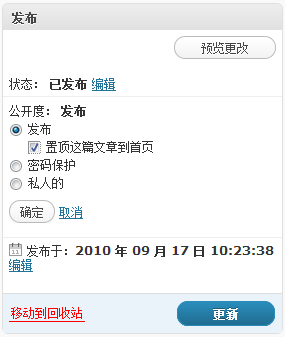
wordpress获取置顶文章设置
一次性把置顶文章全部找出来,然后用列表的方法呈现
方法简介:通过get_option(‘sticky_posts’)函数把置顶文章id全部找出来,再通过query_posts()函数对这部分id的文章循环列表输出
获取置顶文章代码如下:
<ul>
<?php
    $sticky = get_option('sticky_posts');
    rsort( $sticky );//对数组逆向排序,即大ID在前
    $sticky = array_slice( $sticky, 0, 5);//输出置顶文章数,读取最近5篇置顶文章
    query_posts( array( 'post__in' => $sticky, 'caller_get_posts' => 1 ) );
    if (have_posts()) :
    while (have_posts()) : the_post();
?>
     <li>
      <a href="<?php the_permalink(); ?>" title="<?php the_title(); ?>" rel="bookmark">
          <?php the_title(); ?>
      </a>
     </li>
<?php endwhile; endif; ?>
</ul>
推荐文章