wordpress特色图像功能使用教程
十度 wordpress 2015年12月20日
收藏
wordpress自2.9版本以来,在撰写新文章过程中引入了特色图像功能,使用改功能可以很方便地在首页、分类页等列表页面显示文章的缩略图。wordpress特色图像功能使用教程使用如下:
第一步:在你主题的functions.php添加如下代码:
if ( function_exists( 'add_theme_support' ) ) {
	add_theme_support( 'post-thumbnails' );
}
第二步:在你撰写新文章页面右下角点击设置特色图像,如下图: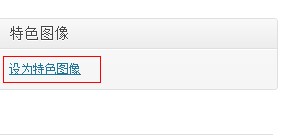
第三步:在相册中添加指定特色图片:
第四步:在需要显示特色图像的地方插入以下代码:
<?php if ( has_post_thumbnail()) : ?>
   <a href="<?php the_permalink(); ?>" title="<?php the_title_attribute(); ?>" >
   <?php the_post_thumbnail(); ?>
   </a>
 <?php endif; ?>
特色图像缩略图尺寸参数设置:
the_post_thumbnail('thumbnail');       // 小缩略图 (默认 150px x 150px )
the_post_thumbnail('medium');          // 中缩略图 (默认 300px x 300px )-自适应图像比例
the_post_thumbnail('large');           // 大缩略图 (默认 640px x 640px )-自适应图像比例
the_post_thumbnail('full');            // 完整尺寸
the_post_thumbnail( array(100,100) );  // 自定义
其中 thumbnail、medium、large的默认尺寸在后台-设置-媒体中定义。
推荐文章