wordpress Drop-in高级插件的使用
十度 wordpress 2015年12月20日
收藏
wordpress的强大除了可以自定义主题之外,还有一个就是wordpress可以使用插件功能来扩展功能。
wordpress允许使用Drop-in高级插件来替换一些WordPress自身的功能,这类插件一般不大而且没有比较好的指引文档。一般一些内存Cache的功能都是用到Drop-in高级插件这个功能,比如Memcache,APC等,这类插件一般是上传到wp-content/目录中,默认是启动的,插件的文件一般会定义以下两个常量:
// 自定义文档目录
define( 'WP_CONTENT_DIR',  dirname( __FILE__ ) . '/wp-content' );
define( 'WP_CONTENT_URL',  'http://' . $_SERVER['HTTP_HOST'] . '/wp-content' );
来看下本站使用的wordpress memcache插件: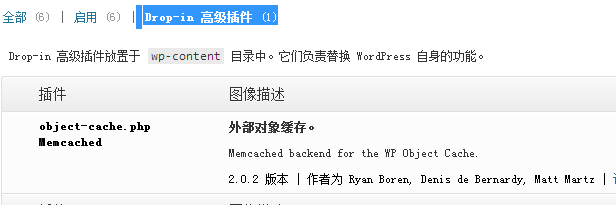
wordpress memcache安装教程可以查看:wordpress使用memcached缓存数据
以下列出一些常用的Drop-in高级插件. Drop-in插件列表可以通过_get_dropins()函数获取.
| File | Type of Dropin | Active since | Context |
|---|---|---|---|
advanced-cache.php |
Advanced or Alternative Cache | Constant WP_CACHE is TRUE |
Single Installation |
db.php |
Own database class | Always | Single installation |
db-error.php |
Own database error alert | At DB Error | Single installation |
install.php |
Own installation routine | At installation | Single installation |
maintenance.php |
Own maintenance message | At updates, maintenance | Single installation |
object-cache.php |
External Object Cache | Always | Single installation |
sunrise.php |
Before the WP Multisite Installation gets loaded | If constant SUNRISE set |
Multisite installation |
blog-deleted.php |
Own message, when a blog gets deleted | If a blog gets deleted | Multisite installation |
blog-inactive.php |
Own message, if a blog is set inactive | If a blog becomes inactive | Multisite installation |
blog-suspended.php |
Own message, if a blog got suspended | When a blog gets marked as archive or spam | Multisite installation |
$locale.php |
functions at active language key | When language key set in constant WP_LANG
|
Single & multisite installation |
推荐文章