wordpress读取文章分类插件:Category Post Shortcode
十度 wordpress 2015年12月20日
收藏
【插件介绍】
Category Post Shortcode是一款在文章页猴子页面中使用wordpress Shortcode简码功能来显示指定分类文章的插件。
【插件安装】
- 下载插件Category Post Shortcode上传至/wp-content/plugins/文件中
- 在后台“插件”菜单中激活该插件
【插件使用】
插件安装后,将以下简码插入到你的文章或者页面中:
[cat totalposts="3" category="1,3" thumbnail="true" excerpt="true" ]
参数说明:
- totalposts – 显示的文章数量. 默认 -1
- category – 分类ID,多个分类使用”,”号隔开
- thumbnail – 是否显示缩略图. 默认 false
- date – 是否显示文章发布日期. 默认false不显示.
- excerpt – 是否显示文章概要,默认true
- orderby – 文章排序规则. 默认 post_date,按发布时间 .
分类文章的样式可以在你主题的style.css文件中设定,例如:
.cat-post{ width:100%; }
.cat-post-list{ display: block; margin-bottom: 20px; position: relative;}
.cat-post-images{ float:left; width:140px; display:block; }
.cat-content{ width:350px; float:right; }
.cat-post-title{ display: block; width:100%; }
.cat-post-date{ display: block; width:100%; }
.cat-clear{ clear:both; }
thumbnail缩略图设置
thumbnail缩略图是通过文章自定义字段“ thumbnail-url”添加的,如下图: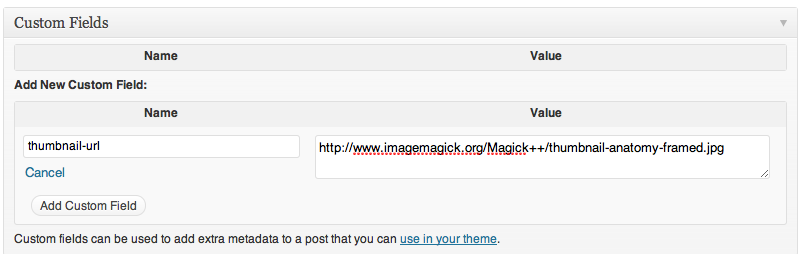
【下载地址】
下载地址:http://wordpress.org/plugins/category-post-shortcode/
推荐文章