灵活而智能的HTTP框架 LiteHttp
十度 手机开发工具
收藏
简介
LiteHttp是一款简单、智能、灵活的HTTP框架库,它在请求和响应层面做到了全自动构建和解析,主要用于Android快速开发。借助LiteHttp你只需要一行代码即可完美实现http连接,它全面支持GET, POST, PUT, DELETE, HEAD, TRACE, OPTIONS 和 PATCH八种基本类型。LiteHttp能将Java Model转化为http请求参数,也能将响应的json语句智能转化为Java Model,这种全自动解析策略将节省你大量的构建请求、解析响应的时间。并且,你能自己继承重新实现Dataparser这个抽象类并设置给Request,来将http原始的inputstream转化为任何你想要的东西。
引言
http://litesuits.github.io/guide/http/get-start.htmlLiteHttp引言,一个案例告诉你它的强大之处。
功能及特点
- 单线程,所有方法都基于一个线程,绝不会跨线程,多线程的事情交给它自带的AsyncExecutor 或者更专业的框架库来解决。
- 灵活的架构,你可以轻松的替换Json自动化库、参数构建方式甚至默认的apache http client连接方式。
- 轻量级,微小的的开销,core jar包仅约86kb。
- 多种请求类型全面支持:get, post, head, put, delete, trace, options, patch.
- 多文件上传,不需要额外的类库支持。
- 内置的Dataparser支持文件和位图下载,你也可以自由的扩展DataParser来把原始的http inputstream转化为你想要的东西。
- 基于json的全自动对象转化: 框架帮你完成Java Object Model 和 Http Parameter之间的转化,完成Http Response与Java Object Model的转化。
- 自动重定向,基于一定的次数,不会造成死循环。
- 自动gizp压缩,帮你完成request编码和response解码以使http连接更加快速.
- 通过网络探测完成智能重试 ,对复杂的、信号不良的的移动网络做特殊的优化。
- 禁用一种或多种网络, 比如2G,3G。
- 简明且统一的异常处理体系:清晰、准确的抛出客户端、网络、服务器三种异常。
- 内置的AsyncExecutor可以让你轻松实现异步和并发的http请求,如果你喜欢,随意使用你自己的AsyncTask或Thread来完成异步,推荐使用更强大、高效的专业并发库。
架构图
一个良好的项目结构:
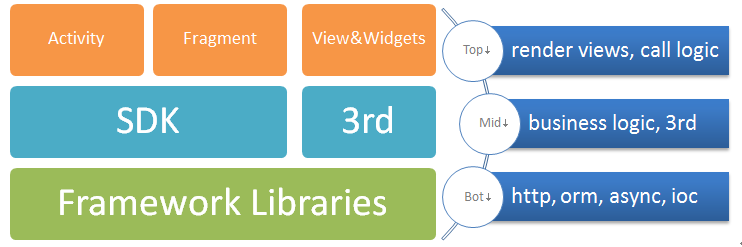
- 底层是业务无关的框架库,用之四海而皆准。
- 中层是针对业务的三方库,以及主要逻辑实现,全部业务都在这里。
-
上层是Activity、Fragment、Views&Widget等视图渲染和业务调用。
这样一个结构,使得你的代码快速在phone和pad以及tv之间迁移,且让你整个更为清晰。那么LiteHttp就位于这个结构的底层。
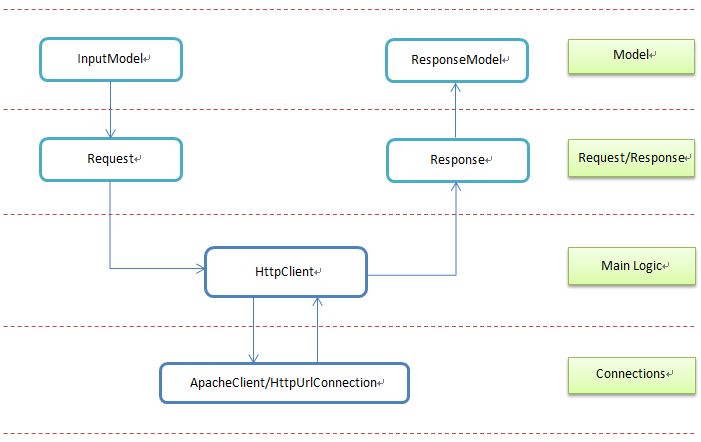
LiteHttp结构模型:
基本用法
基础请求
LiteHttpClient client = LiteHttpClient.getInstance(context);
Response res = client.execute(new Request("http://baidu.com"));
String html = res.getString();
异步请求
HttpAsyncExcutor asyncExcutor = new HttpAsyncExcutor();
asyncExcutor.execute(client, new Request(url), new HttpResponseHandler() {
	@Override
	protected void onSuccess(Response res, HttpStatus status, NameValuePair[] headers) {
		// do some thing on UI thread
	}

	@Override
	protected void onFailure(Response res, HttpException e) {
		// do some thing on UI thread
	}
});
Java Model 作为参数的请求
// build a request url as :  http://a.com?name=jame&id=18
Man man = new Man("jame",18);
Response resonse = client.execute(new Request("http://a.com",man));
man class:
public class Man implements HttpParam{
	private String name;
	private int id;
       private int age;
	public Man(String name, int id){
		this.name = name;
		this.id= id;
	}
}
全自动Json转化
String url = "http://litesuits.github.io/mockdata/user?id=18";
User man = client.get(url, null, User.class);
User Class:
public class User extends ApiResult {
	//全部声明public是因为写sample方便,不过这样性能也好,
	//即使private变量LiteHttp也能自动赋值,开发者可自行斟酌修饰符。
	public UserInfo data;

	public static class UserInfo {
		public String name;
		public int age;
		public ArrayList<String> girl_friends;
	}
}

public abstract class ApiResult {
	public String api;
	public String v;
	public Result result;

	public static class Result {
		public int code;
		public String message;
	}
}
User JSON Structure:
{
	"api": "com.xx.get.userinfo",
	"v": "1.0",
	"result": {
		"code": 200,
		"message": "success"
	},
	"data": {
		"age": 18,
		"name": "qingtianzhu",
		"girl_friends": [
			"xiaoli",
			"fengjie",
			"lucy"
		]
	}
}
多文件上传
       String url = "http://192.168.2.108:8080/LiteHttpServer/ReceiveFile";
	FileInputStream fis = new FileInputStream(new File("sdcard/1.jpg"));
	Request req = new Request(url);
	req.setMethod(HttpMethod.Post)
		.setParamModel(new BaiDuSearch())
		.addParam("lite", new File("sdcard/lite.jpg"), "image/jpeg")
		.addParam("feiq", new File("sdcard/feiq.exe"), "application/octet-stream");
	if (fis != null) req.addParam("meinv", fis, "sm.jpg", "image/jpeg");
	Response res = client.execute(req);
文件和位图下载
// one way
File file = client.execute(imageUrl, new FileParser("sdcard/lite.jpg"), HttpMethod.Get);
// other way
Response res = client.execute(new Request(imageUrl).setDataParser(new BitmapParser()));
Bitmap bitmap = res.getBitmap();
收藏并克隆LiteHttp Github 仓库,可以看到更多的使用案列,方便你进阶。
下载地址
推荐文章