wordpress添加最新评论小工具
十度 wordpress 2015年12月20日
收藏
大部分Wordpress主题都会启用小工具这个功能,话说这是个很傻瓜的功能,但相当实用,只需通过后台拖拽就能实现前台各种显示问题。
小工具制作教程可以查看:WordPress小工具开发教程(网站公告)
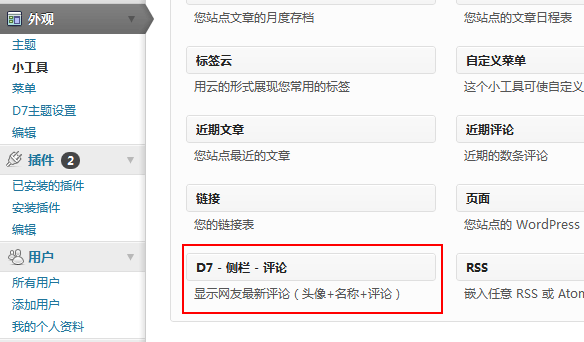
将以下代码放到你主题的functions.php文件中,然后去上图所指地方,你会发现它。当然,在此之前请确保你的主题已经激活小工具,不知道的请Google,她也是我的老师。
register_widget('widget_newcomments');
class widget_newcomments extends WP_Widget {
function widget_newcomments() {
$option = array('classname' => 'widget_newcomments', 'description' => '显示网友最新评论(头像+名称+评论)' );
$this->WP_Widget(false, 'D - 最新评论 ', $option);
}
function widget($args, $instance) {
extract($args, EXTR_SKIP);
echo $before_widget;
$title = empty($instance['title']) ? '最新评论' : apply_filters('widget_title', $instance['title']);
$count = empty($instance['count']) ? '5' : apply_filters('widget_count', $instance['count']);
echo $before_title . $title . $after_title;
echo '<ul class="newcomments">';
echo mod_newcomments( $count );
echo '</ul>';
echo $after_widget;
}
function update($new_instance, $old_instance) {
$instance = $old_instance;
$instance['title'] = strip_tags($new_instance['title']);
$instance['count'] = strip_tags($new_instance['count']);
return $instance;
}
function form($instance) {
$instance = wp_parse_args( (array) $instance, array( 'title' => '', 'count' => '' ) );
$title = strip_tags($instance['title']);
$count = strip_tags($instance['count']);
echo '<p><label>标题:<input id="'.$this->get_field_id('title').'" name="'.$this->get_field_name('title').'" type="text" value="'.attribute_escape($title).'" size="24" /></label></p>';
echo '<p><label>数目:<input id="'.$this->get_field_id('count').'" name="'.$this->get_field_name('count').'" type="text" value="'.attribute_escape($count).'" size="3" /></label></p>';
}
}
function mod_newcomments( $limit ){
global $wpdb;
$sql = "SELECT DISTINCT ID, post_title, post_password, comment_ID, comment_post_ID, comment_author, comment_date_gmt, comment_approved,comment_author_email, comment_type,comment_author_url,
SUBSTRING(comment_content,1,24) AS com_excerpt
FROM $wpdb->comments LEFT OUTER JOIN $wpdb->posts ON ($wpdb->comments.comment_post_ID = $wpdb->posts.ID) WHERE comment_approved = '1'
AND comment_type = ''
AND post_password = ''
ORDER BY comment_date_gmt DESC LIMIT $limit ";
$comments = $wpdb->get_results($sql);
foreach ( $comments as $comment ) {
$output .= "<li><a href=\"" . get_permalink($comment->ID) . "#comment-" . $comment->comment_ID . "\" title=\"" . $comment->post_title . "上的评论\"><em>></em>". get_avatar( $comment->comment_author_email, $size = '32', $default = get_bloginfo('wpurl').'/avatar/default.png' ) . "<strong>". strip_tags($comment->comment_author) .":</strong>". strip_tags($comment->com_excerpt) ."</a></li>";
}
echo $output;
};
进入后台后 就可以看到评论的小工具了!!!喜欢的试试吧
推荐文章